Docs · Settings reference
Settings reference
Settings is where the whole pipeline is configured. Every control is saved as you change it (writes are debounced, so dragging a slider doesn’t hammer the disk), and all pipeline sections start expanded.
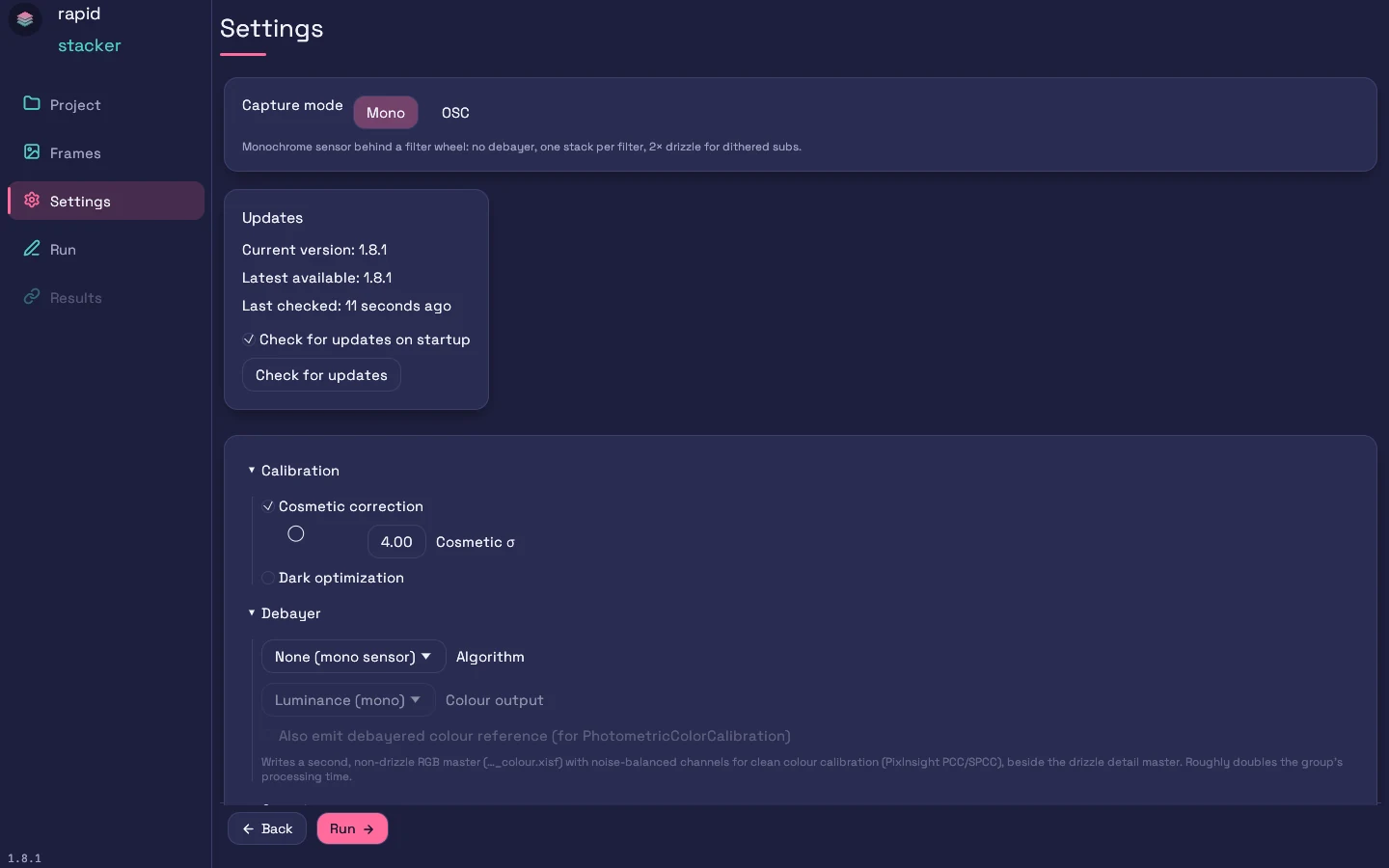
Capture mode
The single most important switch. Selecting Mono or OSC applies a complete, benchmark-validated preset — after which every control remains individually editable. If you have tuned any setting away from the preset, switching asks for confirmation first (it replaces your tuned values; the local Gaia DB path is always kept), and a Reset to profile defaults button appears alongside a “modified” marker whenever your settings differ from the active profile’s recommendations.
- Mono — “Monochrome sensor behind a filter wheel: no debayer, one stack per filter, 2× drizzle for dithered subs.” Preset: PSF-signal weighting, local normalization with scale matching, FWHM quality gate, distortion correction, 2× drizzle with pixel rejection, per-session flats, plate solving, cross-filter alignment + auto-crop — all on.
- OSC — “One-Shot-Colour (Bayer) camera: 2× CFA/Bayer drizzle → three R / G / B channel masters plus a combined RGB stack (four outputs per group), matching WBPP’s drizzled colour output.” Preset: everything from Mono, plus Malvar debayer, RGB + separate channel masters, and the debayered colour-reference master for PCC.
Appearance
Pick how Rapid Stacker looks. A change applies the moment you click it and is remembered the next time you open the app. It only changes the app’s window, never your stacked masters.
- Dark: light text on dark indigo. This is the standard look and the default.
- Light: dark text on light surfaces, for daytime use or a bright room.
- Night: red on black for use at the telescope, so the screen doesn’t spoil your dark adaptation. Everything turns red, including the live stacking preview and the result thumbnails, and progress bars are dimmed.
- Match system: follows your computer’s Light or Dark appearance and switches when it does.
Updates & Support cards
The Updates card is covered in Getting started → Staying up to date. The Support development card links to Buy Me a Coffee — see Support development.
Calibration
| Control | Default | Notes |
|---|---|---|
| Cosmetic correction | On | Repairs hot/cold pixels statistically (8-neighbour comparison). |
| Cosmetic σ | 4.0 (range 2–8) | Lower = more aggressive repair. |
| Dark optimization | Off | Scales the master dark to best fit each light — useful for uncooled cameras or mismatched dark temperatures. |
Debayer
- Algorithm —
None (mono)·Superpixel (½ res)·Bilinear·Malvar (quality)·VNG (PI default). Malvar is the recommended default for OSC (a quality method PixInsight doesn’t offer); VNG is a port of PixInsight’s own default if you want byte-for-byte familiarity; Superpixel halves resolution but is immune to interpolation artifacts. - Colour output —
Luminance (mono)·Combined RGB·RGB + separate R/G/B masters. The last matches WBPP’s “separate channels” output. - Also emit debayered colour reference (for PhotometricColorCalibration) — with RGB output and drizzle both on, writes a second, non-drizzle RGB master (
…_colour.xisf) with noise-balanced channels for clean PCC/SPCC, beside the drizzle detail master. Roughly doubles that group’s processing time.
Grouping
- Combine exposures — Off by default: each distinct exposure time of a filter forms its own stack, matching WBPP. On: all exposures of a filter integrate into one master.
- Exposure tolerance — 1.0 s. Exposures within this many seconds group together, so capture jitter (299.998 s vs 300.0 s) doesn’t split one set into separate stacks. 0 = exact match.
- Split mosaic panels into separate stacks — On (default, and free). Frames of a multi-panel mosaic are detected automatically — from NINA-style
OBJECTnames like “M 31 Panel 1”, fromPanel/Tilefolder names, or from distinct sky pointings — and each panel stacks into its own master per filter. Non-mosaic sessions are unaffected; cross-filter alignment and auto-crop also operate per panel. - Build flats per session (one master flat per night) — On (recommended). Build Masters makes a separate master flat per observing night (from each flat’s
DATE-OBS), and each light is calibrated against the flat nearest in time. Off pools all nights’ flats per filter.
Registration
- Strategy —
Stars then phase fallback(default) ·Phase correlation only·Off. The star path detects stars, matches triangle patterns between frames, and fits the transform; phase correlation is the fallback for star-poor frames. - Distortion correction (thin-plate spline) — fits a smooth 2-D correction surface to the residual field distortion after the linear fit. On by default.
- Distortion λ (smoothing) — 0.05 (range 0–1). Higher = stiffer, smoother correction.
- Transform model —
Affine (default)·Projective (homography). Projective helps wide fields with perspective-like distortion. - Resampling kernel —
Lanczos-3 (default)· Lanczos-4 · Lanczos-5 · Catmull-Rom (bicubic) · Mitchell–Netravali · Bicubic B-spline (softest) · Bilinear (soft) · Nearest (diagnostic). Lanczos-3 with the built-in de-ringing clamp matches PixInsight’s standard choice.
Integration
- Rejection — eight algorithms:
Sigma-clip(default) ·Winsorized σ·Linear-fit clip·ESD (Rosner outlier test)·Percentile clip (small stacks)·Averaged σ (Poisson)·Min/Max·Auto (by stack depth). Percentile, averaged σ, and min/max are PixInsight-parity ports; percentile clip is the right choice for very small stacks (< ~8 frames), and Auto picks per group by depth. This selector governs the light integration; master building uses its own defaults. The parameter controls below adapt to the chosen algorithm — only the parameters it actually reads are shown:- σ low / σ high — 3.0 / 3.0 (range 1–6) and max iterations — 5 (range 1–10), for the σ-based algorithms.
- ESD significance (α) — 0.05, for ESD (which ignores the σ thresholds).
- Percentile low / high — 0.2 / 0.1, for percentile clip.
- Drop lowest / highest N — 1 / 1, for Min/Max.
- Local normalization — On. Equalizes per-tile background differences between frames before rejection, so sky-gradient changes across a session don’t masquerade as outliers.
- LN scale matching (per-tile gain) — On. Also matches per-tile brightness gain — essential for clean meridian-flip sessions.
- LN tile grid (N×N) — 8 (range 2–16).
- Per-frame weight — nine schemes:
PSF signal weight(default — the same PSF-flux-based weighting philosophy as modern WBPP) ·PSF flux·Inverse noise·SNR·Star count·FWHM·Eccentricity·Exposure·Uniform. - Reject outlier frames (quality gate) — On. Drops frames whose star FWHM is a clear statistical outlier vs the rest of the group before integration — a bloated frame’s PSF wings smear the stack even when down-weighted. Clean groups are untouched.
Output
- Output format —
XISF (PixInsight native)(default) ·FITS·FITS, compressed (lossless .fits.fz)·FITS, Rice-compressed (fpack q=4, lossy .fits.fz). The two.fits.fzoptions are cfitsio tile-compressed FITS, the containerfpackwrites, readable by funpack, PixInsight, Siril and ASTAP: lossless uses GZIP tiles with no quantisation (bit-exact, typically 1.2–1.5× smaller); Rice-compressed quantises each tile to ¼ of its background noise before Rice coding, exactly asfpackdoes to float images by default (typically 3–5× smaller, but no longer bit-exact). Applies to every finished file: stacked masters, R/G/B channel masters, the colour reference, rejection maps, the mosaic, and Build Masters output. Choose FITS for Siril / ASTAP / Astro Pixel Processor workflows — full provenance and WCS keywords are kept, and an OSC combined-RGB master becomes a standardNAXIS3 = 3planar cube. FITS cannot carry PixInsight’s nativeAstrometricSolutionproperties, so SPCC on a FITS master needs a re-solve inside PixInsight (a warning appears when FITS + plate solving are both selected).
Drizzle
- Enable drizzle — 2×/3× resolution recovery from dithered data (Fruchter–Hook variable-pixel linear reconstruction). Heavier: ≈ 4× the integration cost at 2×. Both capture-mode presets enable 2× drizzle; for OSC this is true CFA/Bayer drizzle — raw Bayer samples scatter directly into their colour planes.
- Scale — 2.0 (range 1–3). pixfrac — 1.0 (range 0.1–1.0): the drop shrink factor; lower is sharper but needs more, well-dithered frames.
- Pixel rejection (sigma-clip drops) — On. Clips cosmic rays and satellite trails out of the drizzle using the rejection sigmas above; works best with local normalization on.
- Drop kernel —
Square(default) ·Point·Circular·Gaussian. Circular/Gaussian drops cover less area per frame — at low pixfrac they need more dithered frames for full coverage.
Alignment & crop
- Align filters to a common reference — registers every group’s frames to one global reference (the best frame across all filters) so per-filter masters come out mutually pixel-aligned, like WBPP’s cross-channel registration. Groups with a different binning or sensor keep their own reference. Costs a second registration pass.
- Auto-crop ragged borders — trims the low-coverage border left by dithering / field rotation (like WBPP’s autocrop). With cross-filter alignment on, one common crop keeps every master aligned and identically sized.
- Coverage fraction — 1.0 (range 0.5–1.0). 1.0 keeps only pixels covered by every frame (strict, WBPP default); lower keeps more border at reduced depth.
Mosaic
- Assemble mosaic from panels — Off by default. After stacking, stitches each filter’s panel masters into one seamless mosaic: panels are placed by their plate-solve coordinates, star-refined at the overlaps, sky-matched, and feather-blended. Requires plate solving on (each panel master must carry a WCS) and mosaic panels detected on the Frames screen; every panel of a filter must land at one output scale. Panel detection (Grouping → Split mosaic panels) is free — this control assembles the detected panels.
- Seam feather (px) — 64 (range 8–256). Width of the cross-fade band where panels overlap.
- Sky-match degree — 1 (range 0–2). 0 = constant offset, 1 = planar (default), 2 adds curvature (risks bending real nebulosity).
- Star-refine panel placement — On (recommended). Corrects the few-pixel relative error between panel plate solves by matching stars in the overlaps.
Background extraction
- Flatten background (gradient removal) — Off by default. Subtracts a smooth low-order sky surface from the finished master to remove broad light-pollution / vignetting gradients (like PixInsight ABE). A higher Polynomial degree (1–6) removes more but can absorb large-scale nebulosity — keep it low (1–2) for targets with extended emission.
Astrometry
- Plate solve (WCS) — solves the finished master against Gaia DR3 and embeds a WCS (and PixInsight-native astrometric properties) in the output. Needs RA/Dec + pixel scale hints in the frame headers, plus either an internet connection or a local Gaia database; skipped silently if hints are missing.
- Catalog mag limit — 17.0 (range 10–21). Query timeout (s) — 30 (range 5–120).
- Local Gaia DB — optional: point it at a PixInsight Gaia XPSD database folder (the
.xpsdfiles). When set, plate solving runs fully offline — no internet needed. Leave empty to use the online ESA Gaia service. The picker validates the folder and reports how many catalog files it found — a folder with no.xpsdfiles shows a warning instead of silently falling back to the online service.
Command-line tool
Shows where the bundled rapid-stacker-cli lives, with a Copy button for the full path, and whether a terminal can find it. On macOS it adds an Install command-line tool button that links the tool into /usr/local/bin. On the AppImage it points you to the standalone Linux download instead. See Getting the CLI.
About
The About card at the bottom of Settings shows the app version and a View third-party licenses button that opens the full open-source attribution document bundled with the app — the same THIRD_PARTY_LICENSES.md that ships beside every installer. Rapid Stacker is based in part on software from the PixInsight project, developed by Pleiades Astrophoto and its contributors (pixinsight.com).
Next steps
- Running a stack — what the pipeline does with these settings
- Features & support — what’s included